


General Data Protection Regulation
Introduction
GDPR is a shared responsibility between you the data controller (practice/the clinician) and Gensolve Practice Manager as the data processor.
Together we are responsible for protecting the individuals rights (your client) in accordance with the regulation stipulated here by ICO, the governing authority.
As the controller, it is the practice’s responsibility to enforce what personal data is collected and how you choose to process this data.
Our Obligations
As a cloud-based practice management system, we are your processor and our responsibility is to protect the data and provide the processing required by you, as the controller.
Gensolve Practice Manager uses systems such as our Support ticketing software where we need to capture your details. For this we need your consent as our client. To learn more please refer to our privacy policy.
If you use other data processors you will need to ensure that you have a Data Processing Agreement (DPA) in place with them.
What you need to Know
The following does not constitute formal advice. If you are unsure about anything in relation to GDPR we suggest you refer to the ICO or seek a professional opinion from a Data Protection Specialist.
It is in your best interest to make periodic checks of latest developments with the governing body Information Commissioner's Office to ensure your operating policies remain in compliance.
Security
To ensure your data is safe from potential breaches within our own organisation and external attempts to infiltrate data, we invest in continuous improvements to our infrastructure and operating procedures to provide the highest level of security.
Should there be any breach of data we will communicate this and provide a plan for remedial actions within 72 hours of becoming aware of the breach, where feasible.
The biggest risk to your data will be related to your contractual agreements with staff, but the following measures can be used to tighten access and functionality in GPM only to those that absolutely need it.
-
User accounts access policy.
-
User roles and permissions.
Fundamental GPM Knowledge
Administration
Gensolve has evolved over the past 15 years supporting many business scenarios. Much of the functionality required by GDPR is existing core functionality.
The following provides guidance on how you can configure GPM for compliance.
See the Administration Configuration Guide below for a review of how standard features of GPM can be configured to help you with GDPR compliance, but also running your business more efficiently in general.
GDPR Client Rights
The following pages provide guidance where GPM specifically can assist you to be GPM compliant with regards to your client’s individual rights.
You can see an overview of:
Administration Configuration Guide
The following section provides an overview for how an Administrator might decide to configure key reference data to support your practice’s operating procedures when implementing GDPR compliance.
At a glance these are topics your administrator(s) will need to have a strong understanding:
Security - Accounts Access Policy
-
Don’t allow any users to share accounts and passwords.
-
Set password expiry period for all users.
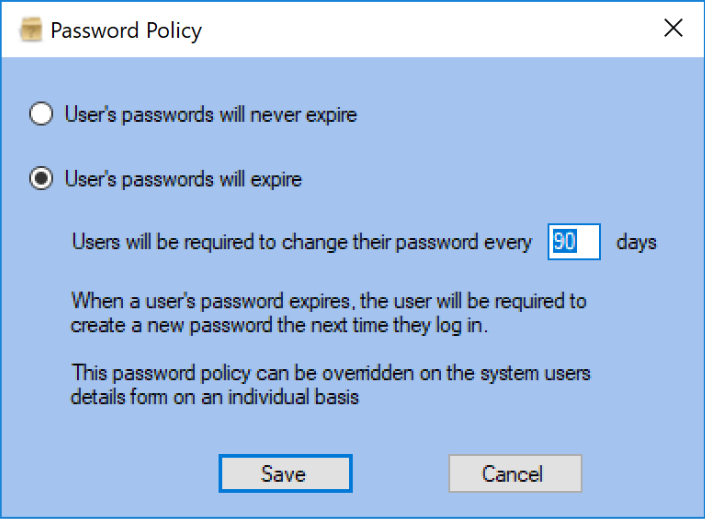
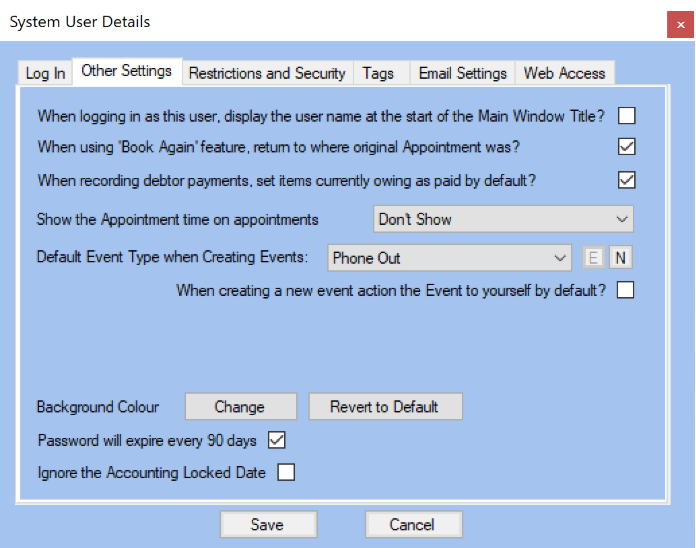
-
Restrict access times and locations.
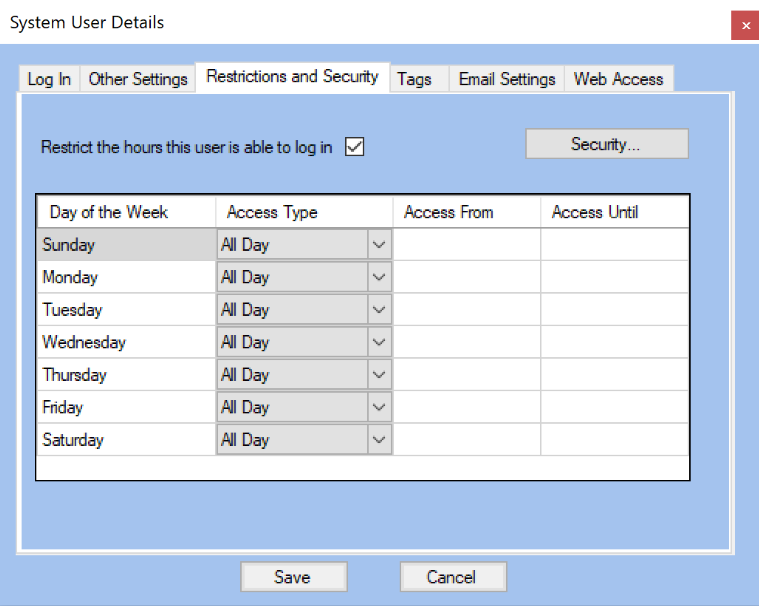
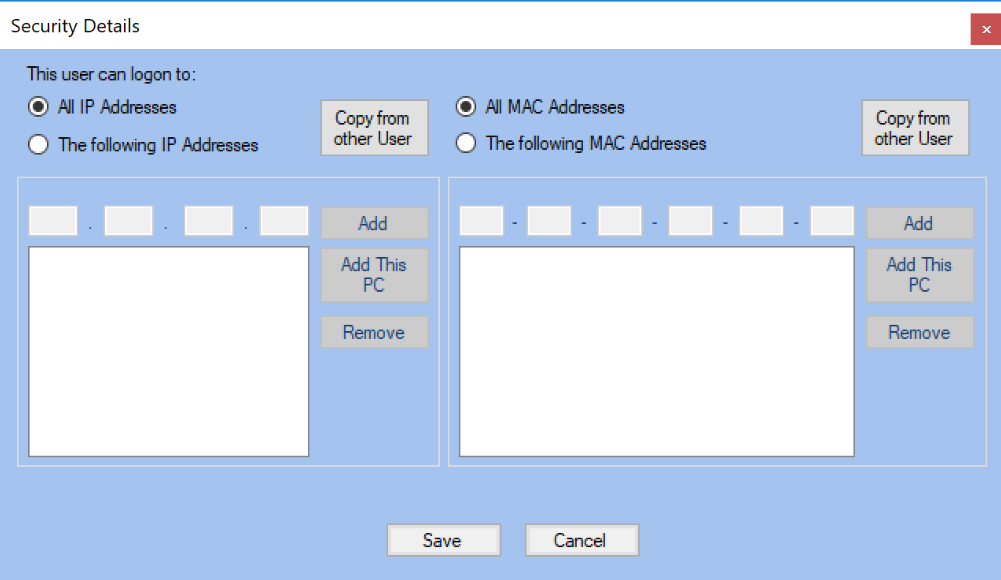
Security - Roles and Permissions
-
Give users roles that have bare minimum functionality to perform their role.
-
Pay particular attention to reporting and data export functionality, we suggest it be a person of high responsibility and integrity.
Vendor Settings
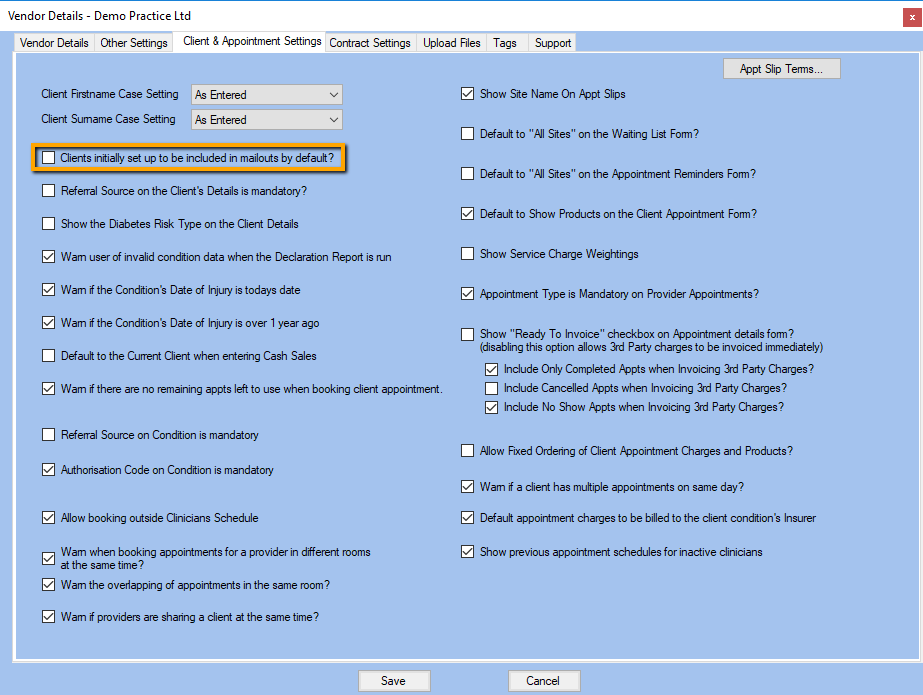
Vendor → Client & Appointment Settings.
You can configure your Vendor settings to ensure they do not include automatic mailout option for your clients. Please refer to your Vendor Details screen.
Highlights
If your practice allows initial verbal consent you could use a highlight to provide a reminder to have the client sign a consent form when the are physically at the practice.
Event Types
For any GDPR action requested by a client and taken by your team we suggest it could be tracked using Custom Event Types to help remind your team of actions that are required. This provides a history of when actions have been taken should you be audited.
-
GDPR Guardian Consent.
-
GDPR Restrict processing.
-
GDPR Object to marketing.
-
GDPR Request to be forgotten.
-
GDPR Access Request.
-
GDPR Data Provided.
For best practice and to help with any audit trail, we suggest creating a custom event (as shown below) actioned to the Practice Manager.
-
GDPR Compliance Review.
Event Templates
When you review the GDPR Client Rights section, you will note that each regulation has a process with steps you can follow for compliance.
If you choose to, you can enforce these steps by creating a custom event template that will enable you to set in order a number of event actions.
Client Groups
Additionally setting GDPR steps taken in client groups will help with providing a quick visual status on history when viewing the client details form during editing. You can filter and report on the client status, for example during tracking.
Clients that were minors, so previously have had Guardian Consent, but who are now old enough to provide consent directly.
Clients that requested not to be processed by other systems can be filtered from data exports by saving a query that filters clients that have been assigned to the “GDPR Restrict processing” group. See Right to restrict processing for details.
-
GDPR Restrict processing.
-
GDPR Object to marketing.
-
GDPR Guardian Consent.
-
GDPR Data Provided.
-
GDPR Request to be forgotten.
-
GDPR Access Request.
Letter (Data Export) Templates
-
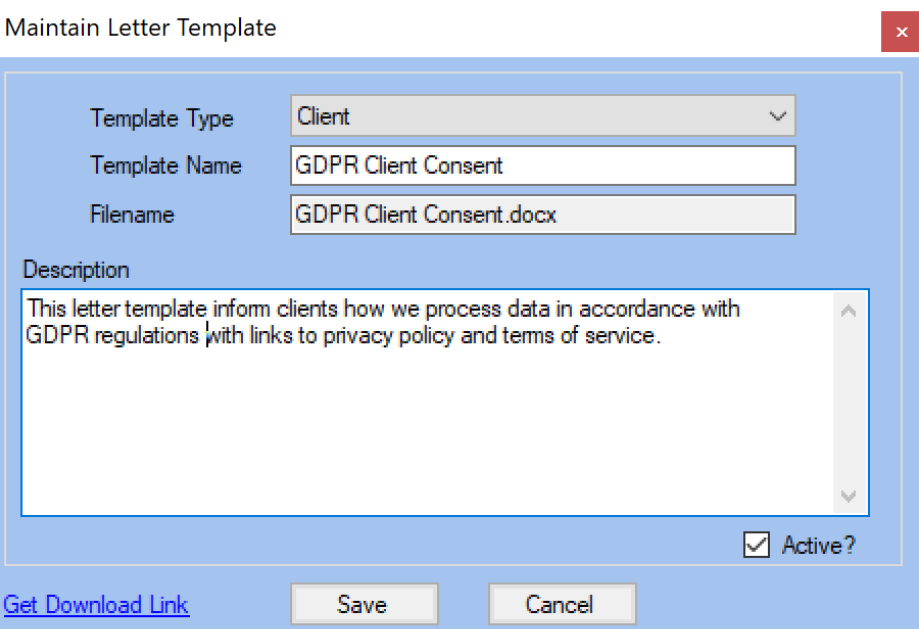
GDPR Client Consent.
-
Any other letters you desire for running GDPR.
Export Templates:
The following can be used as alternative options when completing data portability requirements:
-
Client
-
Conditions
-
Condition Exams
Relevant to:
Email Templates
We suggest having at least one email template to standardise communications for each of the 8 GDPR regulations that are specific to the client. Below are some examples for email templates that you may wish to setup.
-
Intro to rights with letter template which could be signed electronically.
-
Confirmation of verbal consent.
-
Confirmation of written consent.
-
Confirmation of request with;
→ Request for proof of identification.
→ Attached template of what data is available / requested.
-
Confirmation of request with timeline for expected delivery.
-
Completed actions with an attached zip file.
-
Confirmation of personal details to be updated.
-
Confirmation of personal details that have been updated.
-
Confirmation should no longer be sent promotional material.
-
Confirmation details will not be sent to any 3rd party system or business.
-
Confirmation of pending erasure and what that means.
Reports and Saved Search Filters
See Reports → Template Merge for exporting GPM data.
-
GDPR Marketable Clients.
-
GDPR Not Restricted for Processing.
-
GDPR Overwrite Guardian Consent.
Clinician Appointment Type
On a regular (monthly) basis create a dedicated time slot in your diary to review your compliance procedures.
-
GDPR compliance review.
Custom Forms
Potentially a custom form could be used for the purposes of being compliant to:
FAQs
Can consent be verbal?
-
The GDPR imposes tougher requirements on consent, though both written and verbal consent is valid when it meets these conditions.
-
Verbal consent should be recorded wherever possible to provide an audit trail, and subjects must always be informed they are able to withdraw their consent at any time.
-
If consent is verbal, the same principles apply and confusing language should be avoided to ensure data subjects are aware of how their data will be used and their rights.
-
If relying on verbal consent, phone operators should follow a defined script which clearly explains an individuals rights, and data should not be further processed without consent.
Email Security - Encryption
Industry consensus indicates that technically HTTPS is all you will need to be GDPR compliant. Of course, as part of our ongoing GDPR responsibilities we will continue to monitor the standard set around this.
The protocol used to send your email is not something that Gensolve controls, as we connect to the email service you have configured with your Internet Service Provider. HTTPS is standard with main providers such as GMail, Hotmail, Apple Mail & Outlook but you will just need to verify specifics directly with your provider.
