


Right to Object
According to GDPR:
Taken from the Information Commissioner’s Office website:
-
The GDPR gives individuals the right to object to the processing of their personal data in certain circumstances.
-
Individuals have an absolute right to stop their data being used for direct marketing.
-
In other cases where the right to object applies you may be able to continue processing if you can show that you have a compelling reason for doing so.
-
You must tell individuals about their right to object.
-
An individual can make an objection verbally or in writing.
-
You have one calendar month to respond to an objection.
See this ico article to keep up to date with latest developments.
On GPM's end:
Process
Gensolve has defined GPM to be able to erase clients upon not giving consent to manage their data, since patients may decline access to prevent further use (or processing) of their information.
Steps
-
Create a “GDPR Right to Object” event to record the client request and set a due date for action.
-
Upload any written request from client to the client uploads area.
-
Optionally send Client template email confirming request.
-
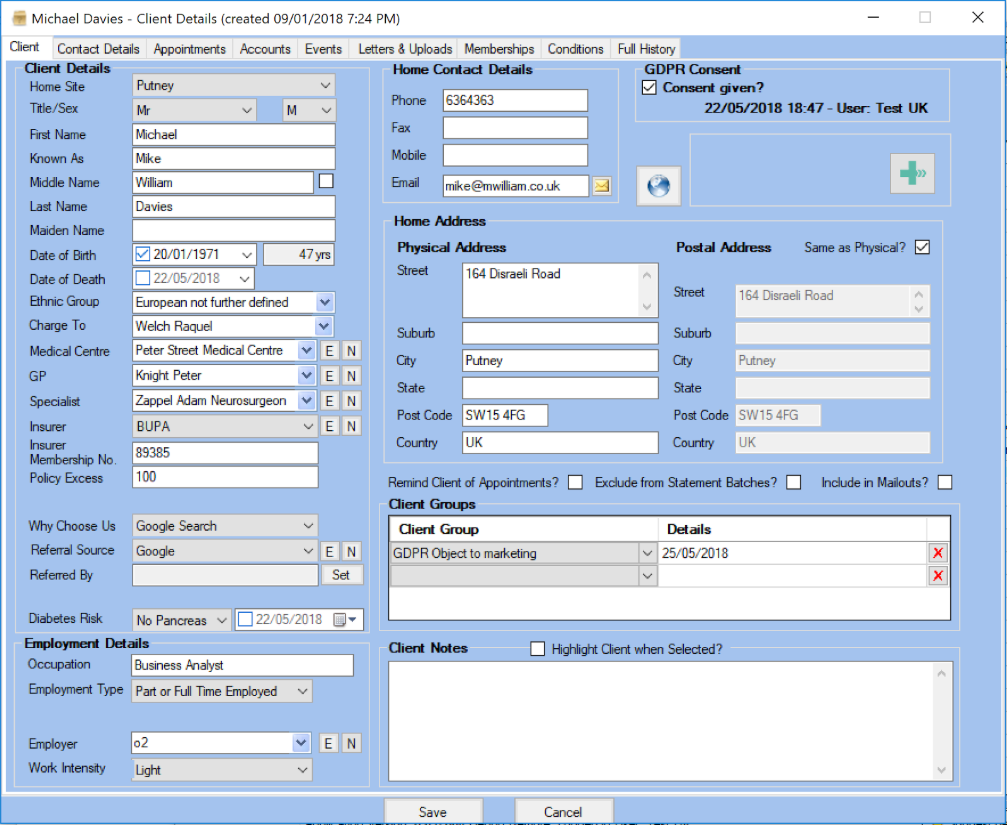
Go to Client Details screen.
-
Ensure “Include in Mailouts?” is unchecked.
-
Optionally add “GPDR Object to marketing” client group with date of action.
-
Send template email or letter to explain action taken.
-
Complete the Todo action / event with any note.
You may also want to take a look at: How to create a Client Event, How to send a mailshot.
