


Miscellaneous Reports
Running Miscellaneous Reports
Miscellaneous Reports consist of two extra reports offered in a different view that what is already available in other categories.
- Go to Reports >> Reports and select Miscellaneous from the Report Category list
- Then select a report in the Report to Run list
- Setup the filters to select the data to be run for the report
- Click on Run Report to generate the report.
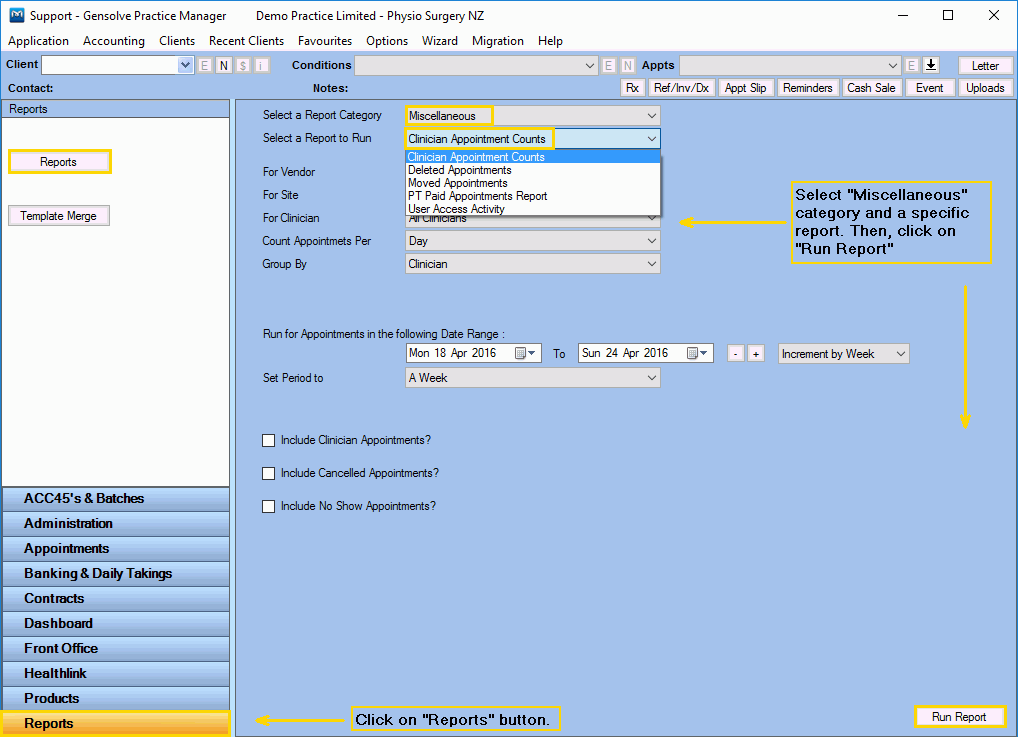
The Miscellaneous Reports
Click on a miscellaneous report below for a more detailed description.
| Report | Description |
|---|---|
|
This Report shows the appointment numbers based on Vendor, Site, Clinician and Count Period. |
|
|
This Report shows all Deleted Appointments within a specified date range. |
|
|
This Report shows all Moved Appointments within a specified date range. |
|
|
This Report shows all Personal Trainer Appointments within a specified date range. |
|
|
This Report shows the record of the users' access to Letters, Custom Contracts and/or Uploaded Files. |