

ACC32s Awaiting Approval Report
Description
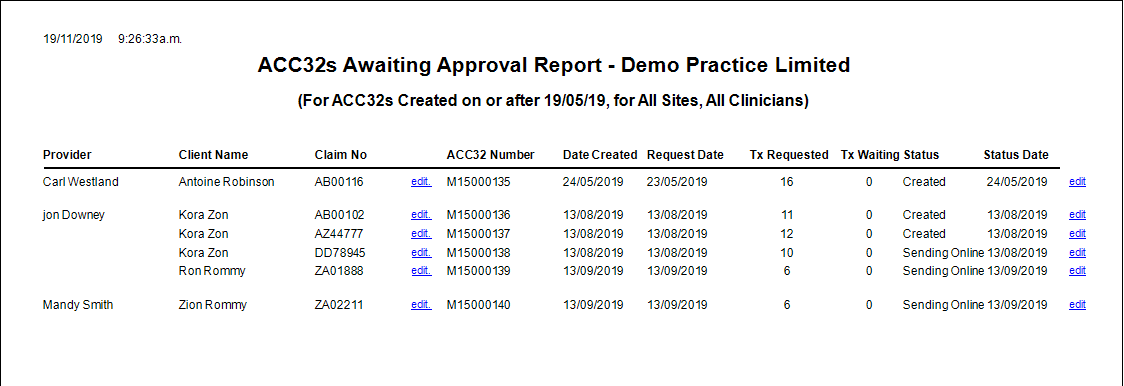
This report shows all ACC32s created in GPM on or after a specific date. It is used to see which ACC32s have not yet been given the Status: 'Approved'. Without an 'Approved' Status the ACC32 cannot be used for clients' appointments.
Running the Report
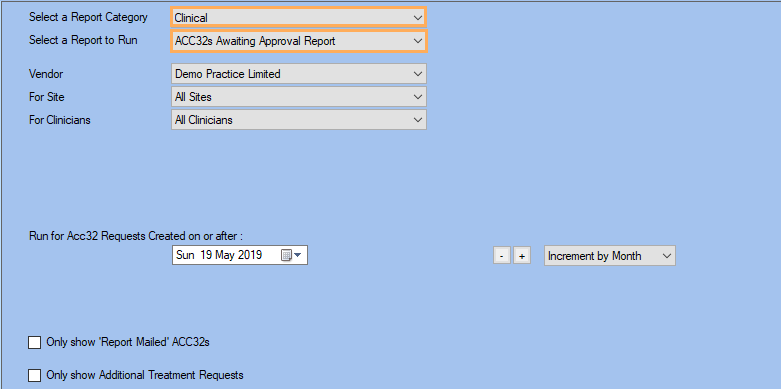
- Go to Reports >> Reports and select Clinical from the Report Category list.
- Then select 'ACC32s Awaiting Approval Report' from the 'Select a Report to Run' list.
- Set up the filters to select the data to be run for the report.
- Click on Run Report to generate the report.
Filters
| Type | Description |
|---|---|
| For Vendor |
This filter allows you to run the report for a specific Site or Site Group |
| For Site |
This filter allows you to run the report for a specific Site. |
|
For Clinician |
This filter allows you to run the report for a specific Clinician/Provider. |
| Created on or After |
This filter allows you to show the ACC32 requests created on or after the date selected (in date picker). |
| Only show "Report Mailed" ACC32s |
This filter allows you to specify whether the report should include only the ACC32s with a status of "Report Mailed". |
| Only Show Additional Treatment Requests |
This filter allows you to specify whether the report should show only the ACC32s which refer to Additional Treatment Requests. |
The Generated Report
From within the report, you can click edit to open the Client Condition details and you can also click on edit on the right-hand side to open the ACC32 itself.