


GPM Built-In Reports - Accounting Form
Description
GPM provides a list of built-in reports which allow you to view your data in a format that fits in with your practice.
Running a Built-in Report
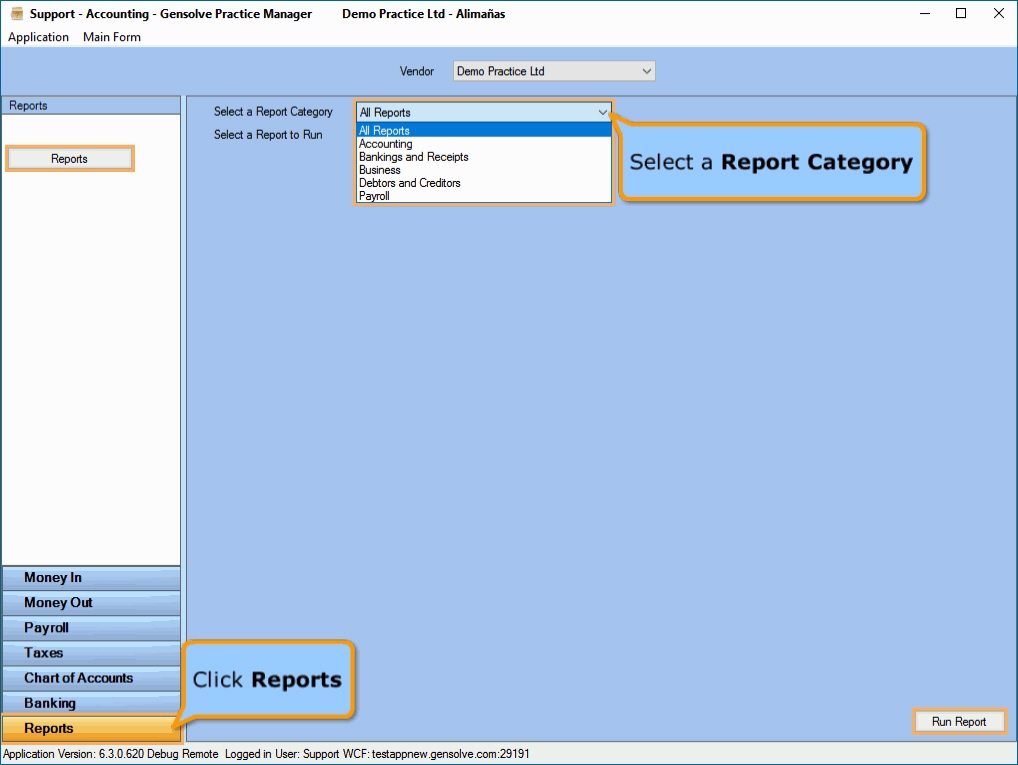
- Go to Accounting >> Accounting Form >> Reports >> Reports.
- Select a Report Category.
- Select a Report to Run.
- Set up the filters to select the data to be run for the report.
- Click on Run Report to generate the report.
Watch this tutorial :  How to Run a Report
Click on a report category below for a more detailed description of each report within it:
- Accounting Reports: These are the Standard Reports that any accounting package would have. They show the financial position of your organisation at a given date, or over a stated period, resulting from its business transactions and operations.
- Bankings and Receipts Reports: These reports show the Daily Takings received which are then available to be included in a Banking.
- Business: These reports show financial data in revenue reports and operating/expenses.
- Debtors and Creditors: These reports show Debtor charges and Creditor charges outstanding as at a given date or stated period, along with the ability to run listings of Debtors and Creditors.
- Payroll Reports: These reports show Employee salary information in summary and detailed form.