


How to Process Transfer Failed Schedules
Issue
A schedule transfer has failed and the items have been re-billed in a new schedule.
However ACC has still paid the failed schedule. How can the payment be processed?
Solution
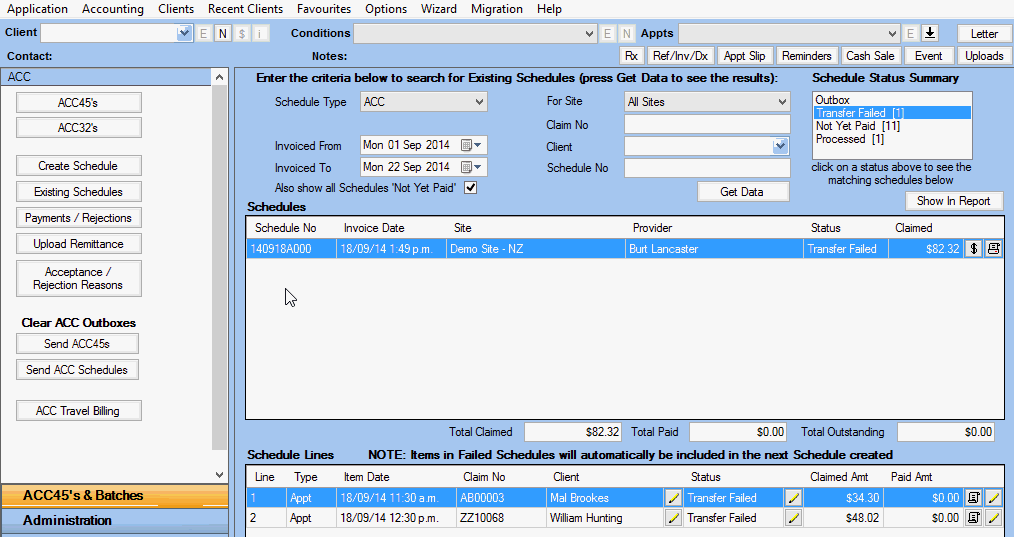
- Retrieve the Transfer Failed Schedule
- Go to ACC45's & Batches >> Existing Schedules
- Ensure you have the correct date range, then click Get Data
- Select Transfer Failed in the Schedule Status Summary to see the details of that schedule
- Click the $ at
the end of the row to record a new Schedule Payment.
- You will receive a warning screen as shown below.
- This warns you that you are about to pay items that have been in a failed schedule, but have been re-billed.
- Click Yes to continue.

- Enter your ACC Payment Reference, Date Paid and any other details as needed.
- Click Save.
Note: In the Other Notes area it states the Failed Schedule Number that you are paying and shows the details below, including the new schedule the items were billed under.