Discharge Summary Report
Description
This report shows treatment outcomes for discharged conditions for a selected date range.
Running the Report
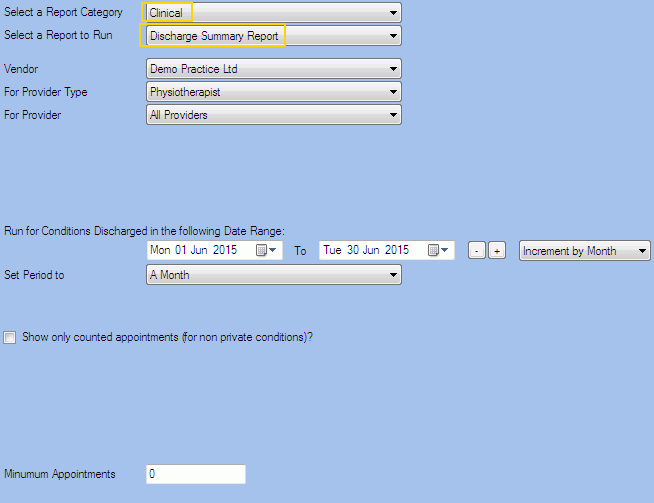
Filters
| Type | Description |
|---|---|
| For Vendor |
This filter allows you to run the report for a specific Vendor. |
| For Provider Type |
This filter allows you to run the report for a specific Clinician/Provider Type. |
| For Provider |
This filter allows you to run the report for a specific Clinician/Provider. |
| Date Range |
This filter allows you to select a date range for which to run the report. This filter can be used in conjunction with "Set Period To". |
| Set Period to |
This filter allows you to set the date range to a specific Period (e.g. Calendar Year, Financial Year etc...). |
|
Show Only Counted Appts? |
This filter allows you to specify whether only Counted Appointments (for non private conditions) should be included in the report. |
|
Minimum Appointments |
This filter allows you to type the minimum appointments to be included in the report. |
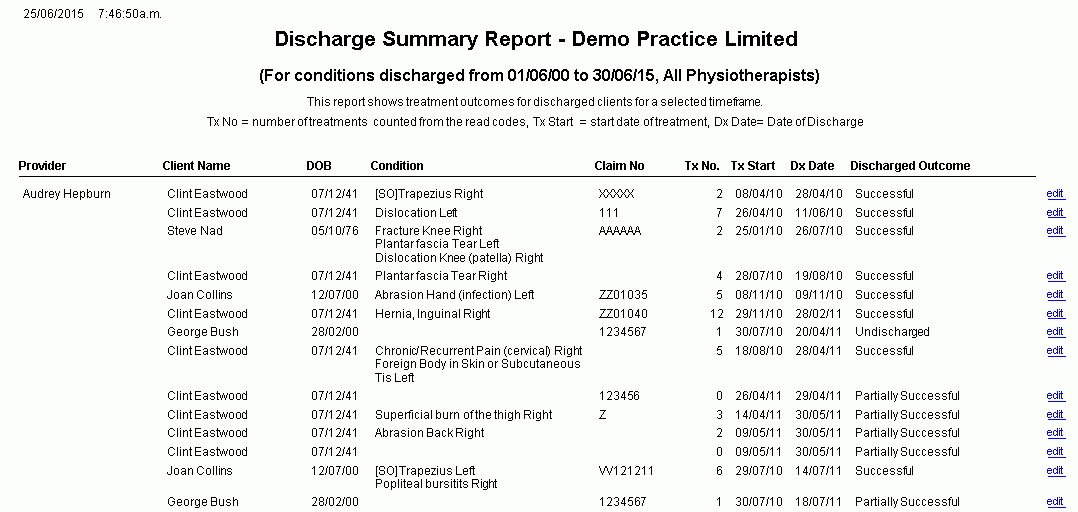
The Generated Report
- Tx No = number of treatments counted from the read codes
- Tx Start = start date of treatment
- Dx Start = Date of Discharge
From within the report, you can click edit to open the Client Condition details.
Note: This is a sample report only.