Custom Contract Detail Report
Description
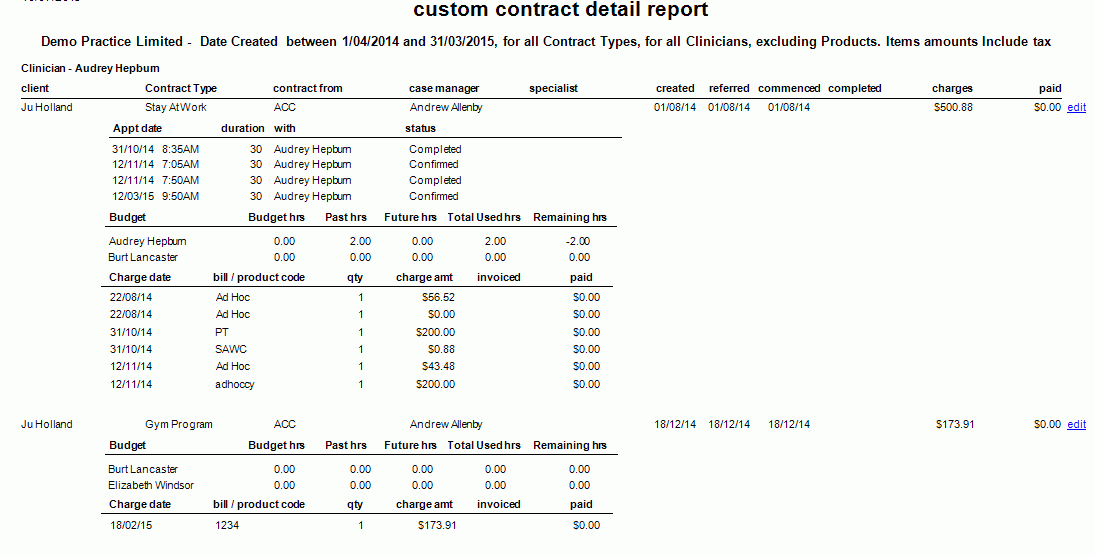
This report shows details of a custom contract within a specific date range. It is used by Practice Managers to see a detailed view of each Contract.
Running the Report
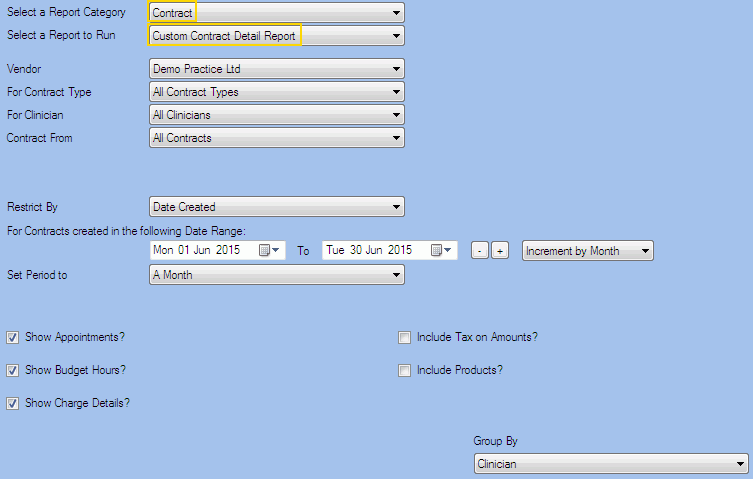
Filters
| Type | Description |
|---|---|
| For Vendor |
This filter allows you to run the report for a specific Vendor. |
| For Contract Type |
This filter allows you to run the report for a specific Contract Type. |
| For Clinician |
This filter allows you to run the report for a specific Clinician/Provider. |
|
Contract From |
This filter allows you to show the report data related to a specific debtor. |
|
Restrict By |
This filter allows you to restrict the report data by the following dates: Created, Referred, Commenced and Completed. |
| Date Range |
This filter allows you to select a date range for which to run the report. This filter can be used in conjunction with "Set Period To". |
| Set Period to |
This filter allows you to set the date range to a specific Period (e.g. Calendar Year, Financial Year etc...). |
| Show Appointments? |
This filter allows you to specify whether the Appointments related to the Custom Contracts should be included in the Report. |
| Show Budget Hours? |
This filter allows you to specify whether the Budgeted Hours should be included in the Report. |
| Show Charge Details? |
This filter allows you to specify whether Charge Details should be included in the Report. |
| Include Tax on Amounts? |
This filter allows you to specify whether amounts (and/or charges) shown in the report should have tax included. |
|
Include Products? |
This filter allows you to specify whether the products should be included in the Report. If this is ticked, you will be able to specify whether the Product Code should be included in the report. Please note that if this last one is unticked, the Product Name will be shown. |
|
Group By |
This filter allows you to group the report data by clinician or contract type. Please note that this filter will change how the totals are displayed. |
The Generated Report
From within the report, you can click edit to open the Contract details.
Note: This is a sample report only.