Condition Visit Summary Report
Description
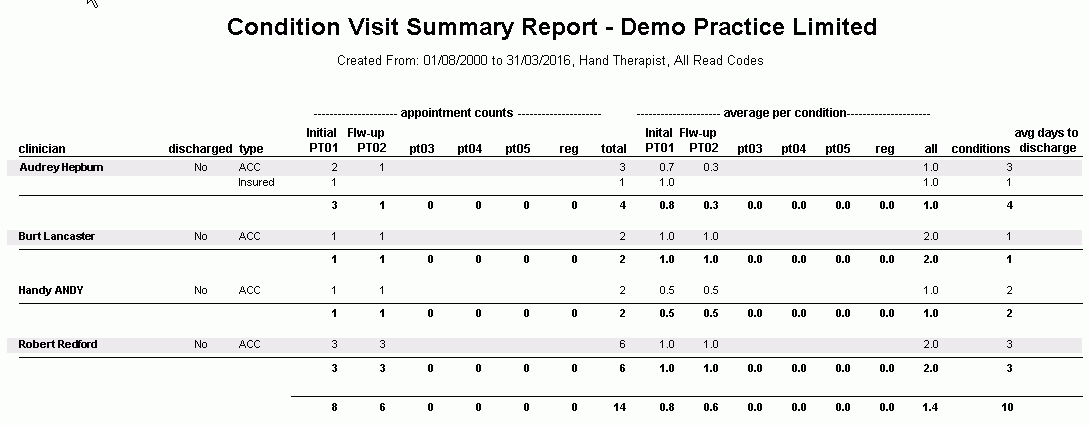
This report shows Appointment Counts for appointment types (Initial, Follow-up), Average Appointments per Condition and Average days to Discharge per Condition.
The report can be run for all or a given Clinician and allows to filter by Discharged Conditions only and by specify Read Codes or All Read Codes.
It is used to get an overview of Conditions and Appointments related to those Condition Types.
Running the Report
Filters
| Type | Description |
|---|---|
| For Clinician Type |
This filter allows you to run the report for a specific Clinician/Provider Type. |
| For Clinician |
This filter allows you to run the report for a specific Clinician/Provider. |
| Date Range |
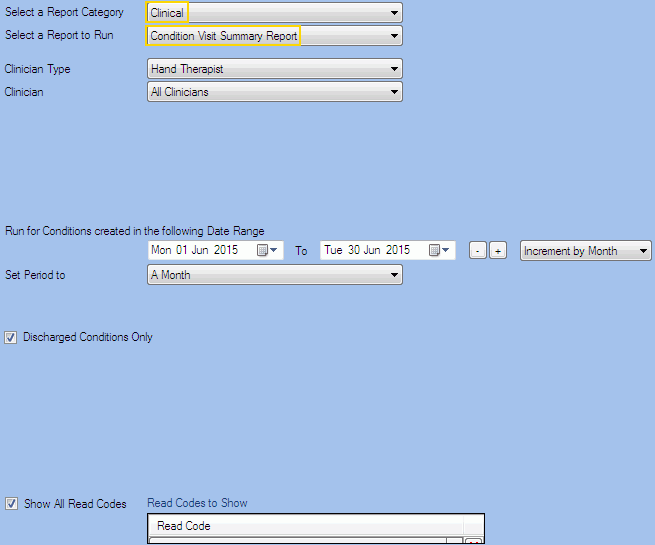
This filter allows you to select a date range for which to run the report. This filter can be used in conjunction with "Set Period To". |
| Set Period to |
This filter allows you to set the date range to a specific Period (e.g. Calendar Year, Financial Year etc...). |
|
Discharged Conditions Only |
This filter allows you to specify whether only Discharged Conditions should be included in the report. |
|
Show All Read Codes |
This filter allows you to specify whether All Read Codes should be included in the report. To select specific read codes, go to the panel on hte right-hand side ("Read Codes to Show") and include/exclude read codes as required. |
The Generated Report