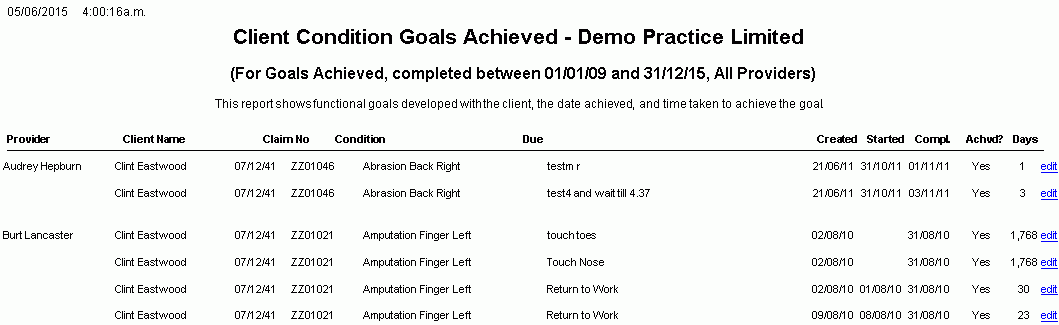
Client Condition Goals Report
Description
This report shows Client Condition Goals (as specified under Daily Notes>>Treatment/Analysis/Plan) developed with the client, the date achieved and time taken to achieve the goals.
Use the filter (Show) to specify the status of the goals (Completed, Achieved, Created etc...) to be reported for the selected date range.
Running the Report
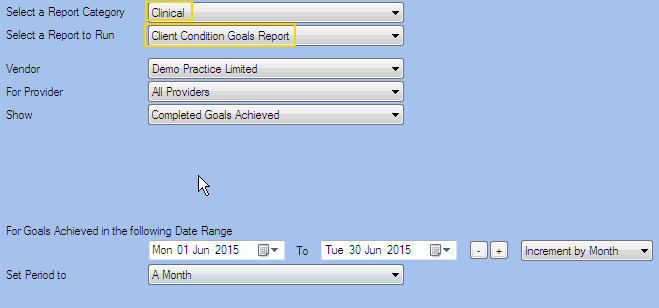
Filters
| Type | Description |
|---|---|
| For Vendor |
This filter allows you to run the report for a specific Vendor. |
| For Provider |
This filter allows you to run the report for a specific Clinician/Provider. |
|
Show |
This filter allows you to select the goals to be included in the report: Completed Goals, Completed Goals Achieved, Completed Goals Not achieved, Goals Created, Goals Not Yet Completed and Goals Started. |
| Date Range |
This filter allows you to select a date range for which to run the report. This filter can be used in conjunction with "Set Period To". |
| Set Period to |
This filter allows you to set the date range to a specific Period (e.g. Calendar Year, Financial Year etc...). |
The Generated Report
From within the generated report you can access the Condition Details page from where you can edit the Exam Notes if required.
Note: This is a sample report only.