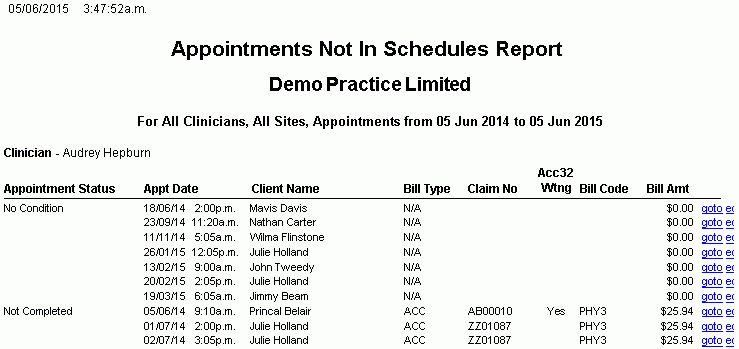
Appointments Not In Schedules Report
Description
This report should be run at least once a week to ensure that All Appointments have been or are ready to be invoiced to either ACC or an Insurer.
If all default check-boxes remain ticked, when you run the report you will see appointments that have not been Completed, have No Condition and are Not Counted and be able to action them in order to change the Status to 'Ready To Invoice' and successfully send them to either ACC or the insurer.
Running the Report
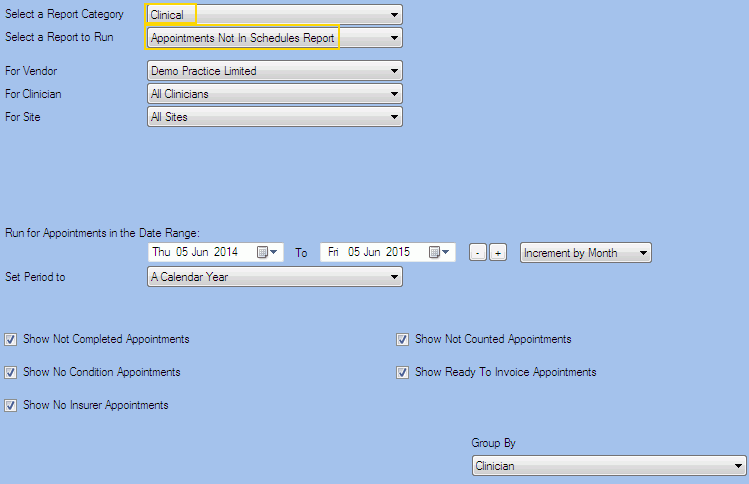
Filters
| Type | Description |
|---|---|
| For Vendor |
This filter allows you to run the report for a specific Vendor. |
| For Clinician |
This filter allows you to run the report for a specific Clinician/Provider. |
| For Site |
This filter allows you to run the report for a specific Site. |
| Date Range |
This filter allows you to select a date range for which to run the report. This filter can be used in conjunction with "Set Period To". |
| Set Period to |
This filter allows you to set the date range to a specific Period (e.g. Calendar Year, Financial Year etc...). |
|
Show Not Completed Appointments |
This filter allows you to specify whether Non Completed Appointments should be included in the report. |
| Show No Condition Appointments |
This filter allows you to specify whether appointments with no conditions should be included in the report. |
| Show No Insurer Appointments |
This filter allows you to specify whether appointments not charged to an insurer should be included in the report. |
|
Show Not Counted Appointments |
This filter allows you to specify whether Not Counted Appointments should be included in the report. |
| Show Ready To Invoice Appointments |
This filter allows you to specify whether Ready To Invoice Appointments should be included in the report. |
| Group By |
This filter allows you to group the report data by clinician or appointment status. Please note that this filter will change how the totals are displayed. |
The Generated Report
From within the report, you can click goto to locate the appointment on the appointment book or edit to open the Client Appointment details.
Note: This is a sample report only.